Accessibility Testing Services and Tools for Websites
A website can look tidy, load quickly and still leave people unable to use it. A menu may need a mouse, a form may announce no useful errors, or enlarged text may disappear behind a fixed banner. Accessibility testing services help teams find these barriers and understand what to change.
The useful starting point is a task. On an entertainment site such as Spinanzia casino, an accessibility review might examine whether account settings and help can be reached with a keyboard and understood with a screen reader. The same approach applies to a council form or an appointment booking: follow the journey far enough to discover where someone could get stuck.
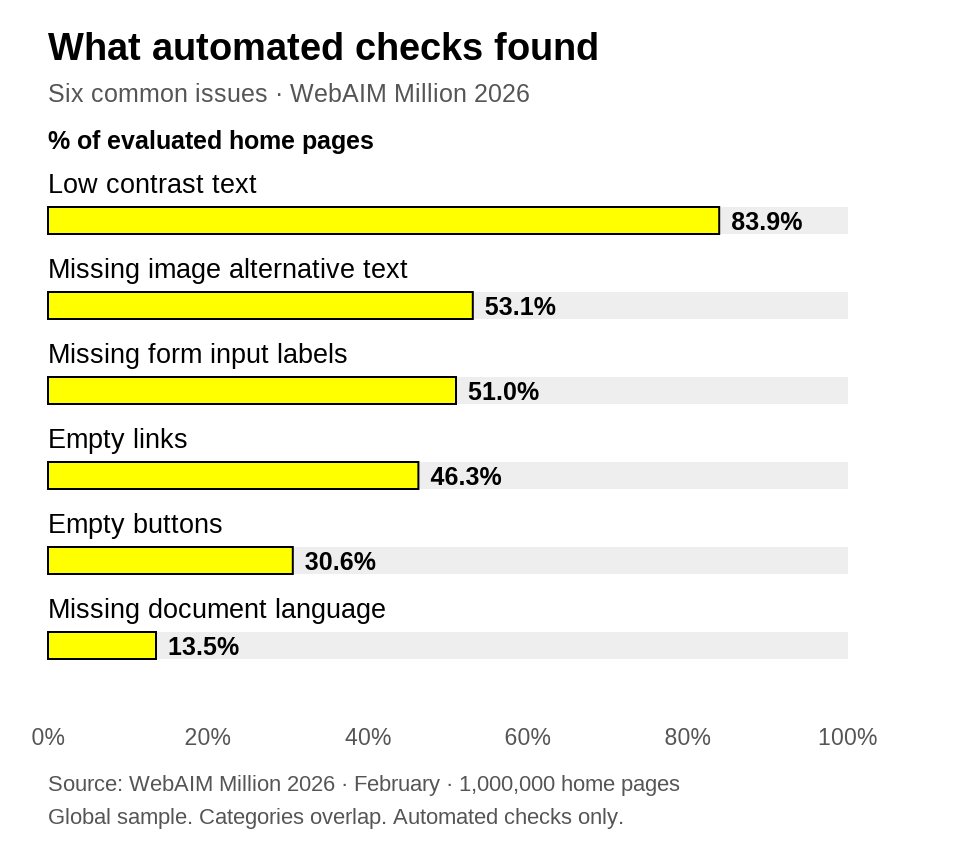
WebAIM’s February 2026 study found low-contrast text on 83.9% of the one million home pages evaluated. Its results show how widespread some detectable barriers remain. These are global findings, rather than Australian figures, and pages may appear in more than one issue category.
View chart data as a table
| Detected issue | Home pages |
|---|---|
| Low contrast text | 83.9% |
| Missing image alternative text | 53.1% |
| Missing form input labels | 51.0% |
| Empty links | 46.3% |
| Empty buttons | 30.6% |
| Missing document language | 13.5% |
What is accessibility testing
Accessibility testing is the process of evaluating whether people with disabilities can perceive, understand and operate digital content. It examines the page structure, written information and interactive behaviour, including how these work with assistive technologies and different ways of navigating.
A useful review combines checks against a recognised standard with investigation of real tasks. The Web Content Accessibility Guidelines, or WCAG, provide testable success criteria. A brief should name the version and conformance level being evaluated; WCAG 2.2 Level AA is a sensible starting point for a new review, subject to the organisation’s requirements.
Accessibility and usability overlap. A screen reader may announce a button correctly, yet its wording may leave a person unsure what happens next. Standards testing identifies technical failures; observing people helps explain the wider experience. Neither perspective should be reduced to a single percentage.
What accessibility testing services should include
Before requesting a quote, describe the site, its main audiences and the tasks that matter. Specify whether the review includes mobile layouts, downloadable documents, third-party widgets and areas behind a login. A scan of public URLs cannot establish how an authenticated application behaves.
A well-defined service should explain its coverage and deliver findings that developers and content authors can act on. Look for:
- A stated scope: the pages, templates, components and complete processes being reviewed, with the sampling approach explained.
- More than automation: manual keyboard, visual and assistive technology checks alongside automated scanning.
- Reproducible evidence: the affected page and state, steps to reproduce, expected behaviour, actual behaviour and relevant WCAG criterion.
- Practical priorities: an explanation of who is affected, whether a task is blocked and how widely the problem occurs.
- Verification after changes: an agreed retest and a record of resolved issues and remaining limitations.
Ask which browser and assistive technology combinations will be used and why. A report should record these details so that a developer can reproduce a finding. It should also distinguish a limited sample review from a broader conformance evaluation.
Choosing web accessibility testing tools
Different tools answer different questions. Choose them around the pages and interactions being tested, rather than assuming that a larger dashboard provides a more complete answer.
| Method | Useful for | Needs further review |
|---|---|---|
| Automated scanner | Flagging detectable markup problems across pages. | The meaning of content and the usability of complete tasks. |
| Browser inspection | Examining accessible names, roles and states. | Whether those properties make sense during interaction. |
| Keyboard and screen reader | Checking navigation, focus and announced information. | Other devices, access needs and user strategies. |
| Sessions with disabled users | Understanding barriers during realistic tasks. | Standards coverage beyond the participants and tasks included. |
WAVE is one example of a tool that highlights potential problems and supports inspection. Browser accessibility panels help examine the properties exposed to assistive technologies. Screen readers such as NVDA and VoiceOver allow experienced testers to explore navigation and announcements. These are complementary methods, and none provides an automatic certificate of accessibility.
Automated web accessibility testing tools can identify some missing names or detectable contrast failures. They cannot reliably decide whether every alternative description conveys the right information, or whether instructions make sense. An image with an unhelpful description can pass a check for the presence of an alt attribute.
Where online accessibility testing helps
Online accessibility testing is useful for an initial review of public pages and for monitoring recurring problems. It can help an editor notice a missing form label or a developer trace an issue to a shared template. Findings still need checking in context.
Confirm what the service actually evaluates. Does it render JavaScript, inspect an opened menu, follow a multi-step form or stop at the initial page? A favourable result for a URL says little about a dialog that the scanner never opened. Browser-based tools can be useful for inspecting states that a remote scanner cannot reach.
For private areas, use an approved test environment and suitable test accounts. Check how a service handles submitted URLs and page content before including sensitive information. Keep a record of the state tested, since the same page can behave differently before and after an error.
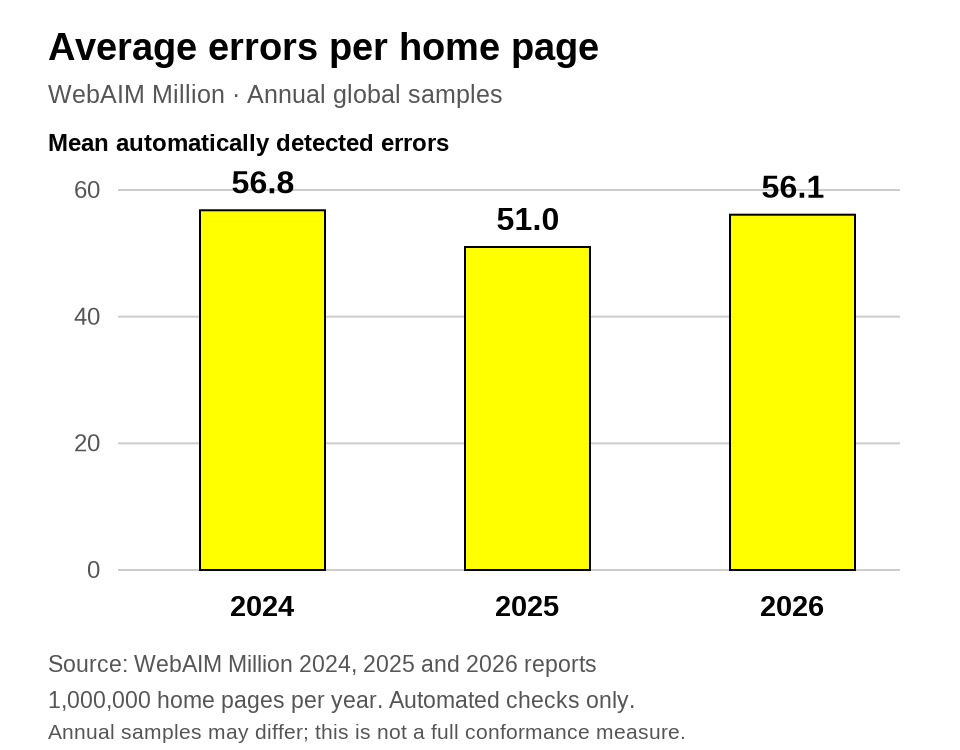
The annual WebAIM Million studies reported a mean of 56.8 detected errors per home page in 2024, 51.0 in 2025 and 56.1 in 2026. A clear automated result is useful evidence about the checks performed; it does not establish that every part of a website is accessible.
View chart data as a table
| Year | Mean detected errors per home page |
|---|---|
| 2024 | 56.8 |
| 2025 | 51.0 |
| 2026 | 56.1 |
A practical approach to accessibility testing for websites
Begin with a representative set of templates and the journeys people need to complete. Include search results, navigation, forms, dialogs, errors and confirmation screens. Shared components deserve attention because one defect can affect many pages.
Follow the keyboard through a whole task
Put the mouse aside. Use Tab and Shift+Tab to move through controls, then the appropriate keys to activate them. Check that focus is visible, the order makes sense and no control traps the user. Open and close menus and dialogs, and check where focus goes afterwards. Include any cookie panel or fixed banner that might obscure the focused control.
Enlarge the page and inspect the content
Increase text size and browser zoom, and test a narrow viewport. Check for clipped instructions, overlapping controls and information that becomes difficult to reach. Review contrast, meaningful headings and links whose purpose is clear. Do not use colour alone to identify errors or required fields.
Check names, instructions and changing information
With a screen reader, examine headings, landmarks, field labels and control names. Submit an incomplete form. Can the person find out what went wrong, reach the relevant field and correct it without losing useful entries? Check whether progress indicators and confirmation messages are exposed appropriately when content updates.
Include people who use different access strategies
Invite disabled participants to attempt realistic tasks using their usual technology where practical, with agreed payment and accessible session arrangements. Observe where the design creates extra work. Avoid coaching someone through a barrier before understanding it. A small study can reveal valuable problems, but its findings should not be generalised to every disability or used alone to establish WCAG conformance.
Turn findings into changes people can use
“Improve the form” is difficult to implement. A stronger finding might explain that, after an unsuccessful submission, the page adds an error above the form without announcing it or helping the keyboard user locate it. Record the steps, the impact, the relevant requirement and a proposed approach to fixing it.
Prioritise barriers that prevent important tasks, while also considering severity, frequency and reach. Ten instances of a shared button problem may require one component fix. One inaccessible confirmation step may block an entire process. The number of warnings alone does not tell you which matters more.
After a repair, repeat the original task and check related behaviour. Add appropriate automated checks to development workflows and retain manual checks for interactions that need judgement. Revisit accessibility when templates, content or third-party components change.
The DingoAccess discussion of web accessibility for older people offers useful background on barriers and control over presentation. It is historical material, so read its technology references in that context. The practical question remains relevant: can the person adjust the page and complete what they came to do?
Good accessibility testing services leave an organisation with evidence, clear responsibilities and verified improvements. Tools help locate problems; careful evaluation establishes what they mean for the people using the website.